Mastering the ChordPro Wizard: From Desktop to Stage
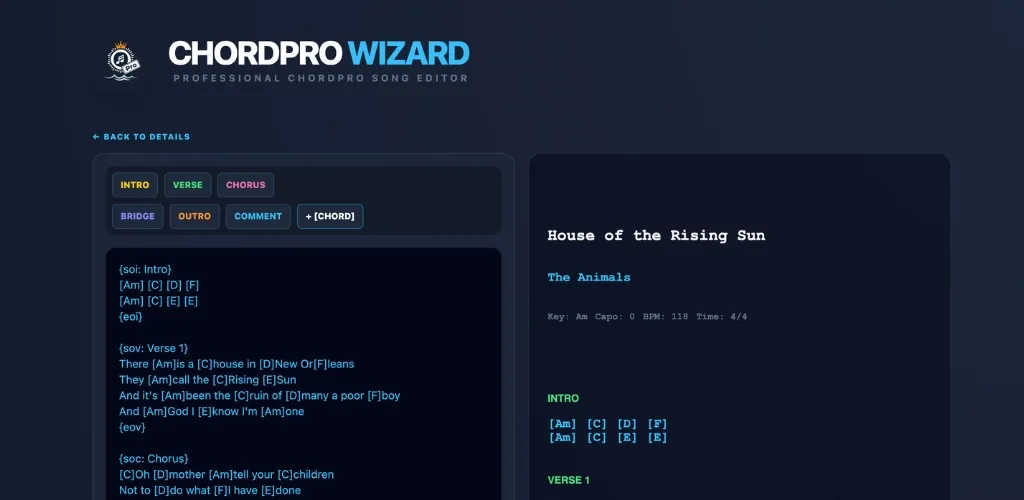
Typewriters are dead, and paper binders are dying. If you've ever tried to type a 10-song setlist on a mobile keyboard, you know it's a recipe for hand cramps and typos.
That’s why we built the ChordPro Editor Wizard. It allows you to use a full-sized keyboard to curate your songs, then export them to your primary lyrics scroller for rehearsals and the gig. Here is the pro workflow.
Step 1: The Bracket Method
ChordPro is a simple way of writing songs where the chord stays attached to the word. Instead of putting chords on a line above the lyrics (which shift when you change font size), you put them inside brackets: [Am].
[G] Sweet home [C] Alabama
[G] Where the [D] skies are so [C] blue
Step 2: Formatting Sections
To make your lyrics scannable under stage lights, use the Wizard's "Section" buttons. Adding {soc} for Chorus and {sov} for Verse tells your teleprompter for musicians to highlight those sections, making everything easier to follow.
Step 3: Moving to Mobile
Once your song looks perfect in the Wizard's preview pane, you have three fast ways to get it onto your device:
- The .txt Export: Save the file and drop it into your Google Drive or Dropbox. Open it on your phone and "Import" inside LyricsFlow Pro.
- The Email Method: Click the "Email" button in the Wizard. Send the text to yourself, then import it directly into the app's editor.
- PDF Print: If you still like a physical backup, hit "PDF" to generate a clean, professional chart for your stand.